If you have decided that use the editor in Russian easier for you, but how to do it remains a mystery - this guide is for you.
The choice of language in program Photoshop
First of all, it is worth checking whether the Russification is precisely in your Photoshop. Go to the editor and follow the following way:
- Edit - Preferences - Interface,
- uI Language window will appear before you,
- if you have language Russian, select it.
- But if, as in the screenshot, you find that the Russian language in Photoshop is not, go to the second step.

As in Photoshop to change the language to Russian - LEng
In this step, you install the Russian language pack to the root folder editor and apply it as in the first paragraph. To get started, check your version of the program for this:
- locate the root folder of the program on the hard disk,
- photoshop.exe click the file, right-click,
- select "Properties" box,
- go to the "Details" tab in the window that appears.
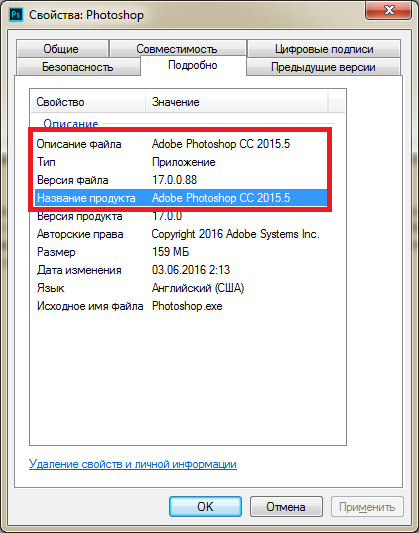
Here you can see the version of the program that designation appears after the words "Adobe Photoshop ...". Now open your browser and type in the search query "crack for Photoshop * * Your version of the editor." Check downloaded files for viruses, do not enter your phone number, do not give any information about yourself. Heed to what you download to your computer, because it may damage the system. It is best to visit forums dedicated editors or site design.
Once you have downloaded the crack, unzip the file to the following address:
- The root folder is the editor - Locales - ru_RU.
The default folder named "ru_RU" stored in the archive, but if it does not exist, just create themselves.

All necessary steps must be performed by an administrator, if you are the guest account, go to the main, or russify editor will not work.
- restart editor
- perform all the steps described in the first paragraph,
- now Russification is available.

Do not download Russifier from dubious sources. If the Russian language does not appear, try to restart the computer. In the absence of a language after rebooting, delete the crack and try to put another.

 0
0 4140
4140