To quickly make the exchange between Webmoney and Yandex.Money wallets, you need to get a certificate. For the webmoney service, this is a mandatory procedure, without which you cannot withdraw your funds at all. Both websites will have to download the scan of the passport and all its data, after some time the account status will be improved. If you have not yet figured out in the WebMoney payment system, you first read the article How to use WebMoney.
How to translate funds on Yandex.Money through your account
If your Yandex wallet already has a confirmation and you entered its passport data into it, then tie the WebMoney account will be very simple.
How to translate funds on a wallet Yandex.Money
- Go to the "Top up" tab at the top of the site.

- Now drop down the page down, you will see a way to replenish the WebMoney Wallet. Click on it.
- If both accounts are authorized and have nominal statuses, then you only need to enter WMID and the amount of write-off. However, when one of the accounts did not pass the check, the translation will not take place. Try to do an operation from the WebMoney wallet.

How to translate funds from Webmoney wallet
- Log in and click on the "Wallet" field in the left column.

- Next, find the "Display means" tab on the right side of the screen.

- In the drop-down list, click "Other output methods".

- List the page down until you see the "Electronic Money" string. It is she who needs you.
- You have left to introduce the amount of the replenishment of the Yandex.Money wallet and click "Translate".
When problems arise with one of your wallets and you cannot confirm it, or go through the personal test, then the money output procedure will change somewhat. Check out the possible options below.

How to transfer funds to Yandex.Money through Megastock service
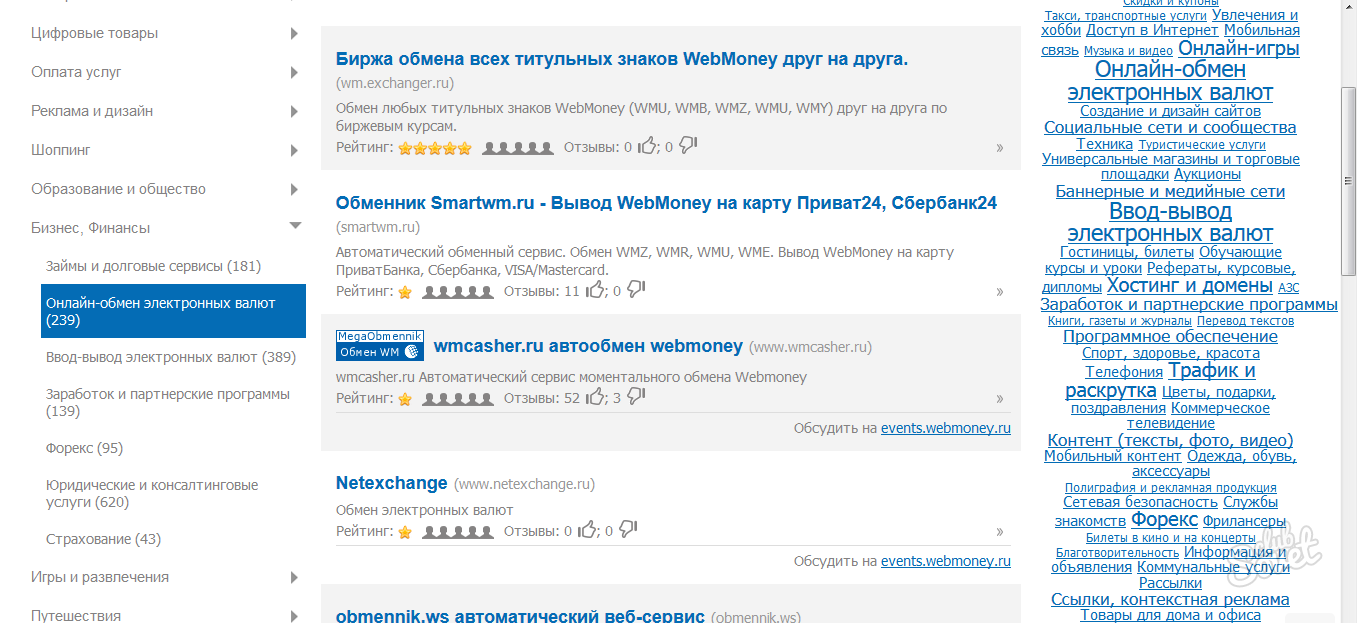
When you want to bypass the commission of payment systems, or avoid the procedure for verifying the personality, the best option will be various exchange electronic points. All of them are collected on the site megastock.
- Go on the link to the site and find the category "Business, Finance". Under it you will see the line "Online exchange of electronic currencies".

Immediately you will have a large list of possible sites of exchangers, as well as the pages of discussing these services. Never translate funds through the site that there are no reviews, or there is only negative. You will need to enter such data:
- The amount of write-off from the webmoney's wallet.
- The desired amount of receiving on Yandex.Money.
Apply for the site and wait for anyone to respond to it.
How to translate funds on Yandex.Money through Exchanger
The functions of this exchanger are very similar to the rest, however, enhanced user protection and authorization through the webmoney account acts here. By applying an application for exchange, you give some amount of deposit if there will be any error in your fault during the transaction, the second user will receive it as compensation.
- Go to the site link https://excherger.money
Click on the "Create a New Application" button.

- Select the Yandex.Money payment system and fill out the necessary form fields. Specify the amount of write-off and the desired amount of replenishment, your e-mailbox, as well as webman's wallet.
As soon as this application responds, you will receive funds during the day. Do not forget to confirm the transaction on the site after that.

How to translate funds on Yandex.Money through other sites
Official service banks.webmoney It will help you to quickly translate, as well as tie the wallets to each other. Here you will also need a certificate, consider it.
- Go on the link to the portal and click on the category "Yandex.Money".

- Confirm the operation using SMS or E-NUM service.

- After that, enter the number of the Yandex.Money wallet. It is easy to find out on the main page of the wallet.
Only after that you can go to enter the amount of write-off and confirm operation.

Now you know how to pay for the Yandex.Money wallet through the payment service of WebMoney in the Personal Account and on third-party sites.

 0
0 412
412