Loading Internet games using a mobile phone is, as a rule, expensive pleasure. Moreover, this process takes a considerable amount of time. Therefore, it will be better to first download them to the computer, and then "throw it" to the phone. How to do - today's material.
1
For the successful implementation of our plan, you will need a pair of programs that can be taken from the network is Midway V2.8, as well as P2KTools v0.7.1.9. We will work first with P2KTools v0.7.1.9. Open the program and see the panel with different tabs. We go into one of them - "Hidden Panels". From the list that is located on the left side of the panel, choose Java. Click down to "count the settings" below.
2
Opposite the KJAVA Splash Screen items, DNS IP display and "Download Application" set ticks and go to "Download Settings".
3
At the point above, we perform the "Restart" command. After these actions on the tab of the phone "Java tools" we will see "Download Java applications". Go to download games. In the menu of your phone "Parameters" you need to activate "Download Java applications" and go here. Then, using the USB cable, connect the phone to the computer. Its display will be the text "Communication JAL Active." Now everything, the phone is ready to download games.
4
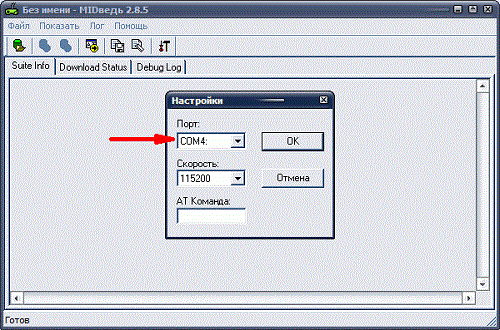
To do this, connect to the MidWay V2.8 utility. Open it. In the settings panel, select the port on which the phone is located. It can be determined from the PC menu in the "Modems" tab.
5
Then on the top line of the panel, click "Open the JAD file" and select the download file. After the download information appears, click "Send JAD".
6
The phone display will appear about the file. The phone key click "Download". After the appearance of the inscriptions of successful download, you can run our application.
That's all the wisdom. We hope that our brief instruction was to help you.




 0
0 3003
3003