Standardly on all Android phones already exists a built-in Play Market, but sometimes it happens that it is not there, so what to do in such a situation, we will analyze in this article.
What is Play Market?
Google Play Market is a program that provides a catalog of free and paid applications that can be downloaded for your phone, as well as films, music and books. A variety of applications can entertain, so and very simplify your life, you only need to choose the theme suitable to your taste and needs.
First of all, let's clarify that this application cannot be installed on the iPhone, iPod, on a laptop or computer. The installation is possible only on the device with the Android operating system. For Apple's products there is a similar application, from Microsoft, with which you can download a varied content.
In most cases, this application, when buying a new phone, already comes with a standard package and only remains to update it, but Chinese phone models can either contain Chinese analogs of the playing market, or do not contain them at all, so we will need to download the installation file.

Where to download the Play Maket installation file?
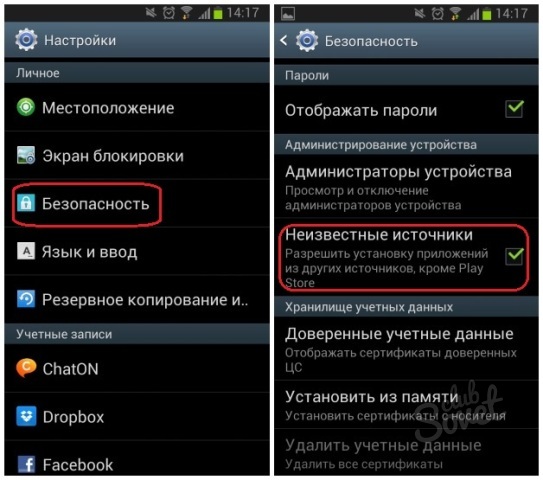
So, first, we need to allow installing applications from unknown sources in the phone settings.
Go to the settings, then go to security (in some phones you need to go to the application point), click on unknown sources and confirm.
Now go to download the installation file with the extension .apk. To do this, we can go through this link. Download Or find a more recent version in the search engine, typing "Download Google Play Market", currently topical version 6.2.10.
How to install Play Market?
The installation will take us not a lot of time.
If the downloaded file is on the computer, you connect the device and copy to the memory card. Now we need to find the installation file where we threw it off.
If you download from the phone, then after the download is complete, you can immediately click on the downloaded file and start the installation, or find it in the folder called Download. After installation, the program icon should appear in the menu.

How to register at Play Market?
After installing the application to the phone, we need to start your Google account before using the functionality.
- We go to the main menu of the application.
- Select the "Settings" item;
- Go to "Accounts" and select "Add Account".
- Follow the instructions on the screen, add an account, create a password for it, etc.


 0
0 1401
1401